Manual sections
Strategy Advisor
Important notice: Due to recent releases, you may find some of the contents of this online manual, including the video tutorials, to be outdated. Specifically, it's important to note that the current Mac version of PokerSnowie does not yet contain all the features, since the Hands Import and Hand Range are not yet implemented. However, our team is working on it. We are also currently in the process of updating these materials. In the meantime, you can get a more accurate description of PokerSnowie's features on the various platforms by visiting the Downloads page and try out the software.
The Strategy Advisor is a tool that provides some key information about what moves you can expect from your opponents in response to your CHECK or BET actions, as well as the probability that you are currently holding the best hand if you go to the showdown. In particular, the Strategy Advisor is available for the player whose hole cards have been assigned and whose turn it is to act.
The information provided in the Strategy Advisor window is based on the Hand Range and Range Advice, therefore it's PokerSnowie's analysis of your opponents, based on the assumption that everyone is playing in a way that PokerSnowie would recommend.
Please note that the Strategy Advisor output excludes from the opponents' ranges the cards that you (or the players whose information you are requesting from the Strategy Advisor) currently hold.
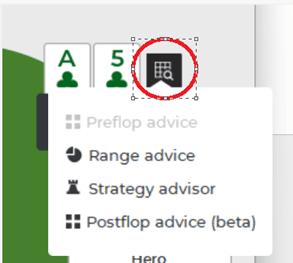
You can access the Strategy Advisor, when it's the player's turn to act, by clicking on the grid icon next to the player cards and select Strategy Advisor from the dropdown.
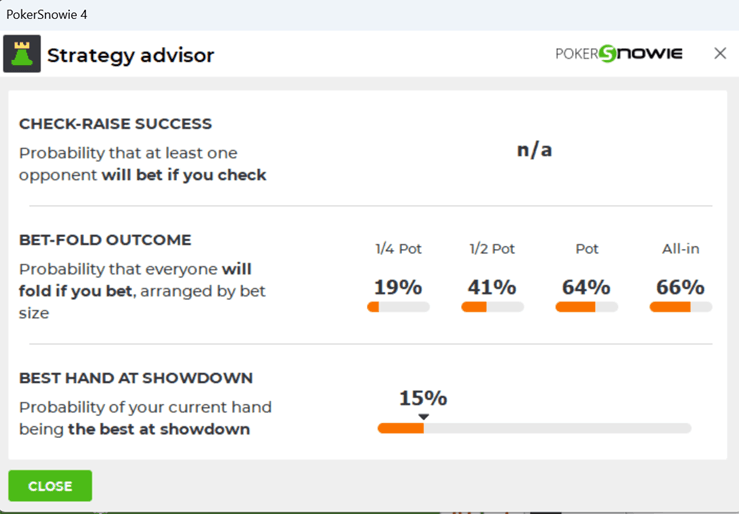
The Strategy Advisor information is displayed in the following format:
The meaning of the displayed percentages is:
- Check-Raise success: the probability that at least one opponent will bet if you check. This might be useful in deciding whether to risk a check-raise strategy.
- Bet-Fold outcome: the probability that everyone will fold if you bet, arranged by bet size. This might be useful if, for example, you are considering a bluff, or you want to make the pot bigger with a value bet.
- Best hand at showdown: based on the PokerSnowie Hand Ranges, this gives you an estimation of how likely you are to hold the best hand, if you went to the showdown immediately.
Please note that when the ranges become very small, the Strategy Advisor probabilities can become inaccurate.