Manual Sections
Post-flop Table
Important notice: Due to recent releases, you may find some of the contents of this online manual, including the video tutorials, to be outdated. Specifically, it's important to note that the current Mac version of PokerSnowie does not yet contain all the features, since the Hands Import and Hand Range are not yet implemented. However, our team is working on it. We are also currently in the process of updating these materials. In the meantime, you can get a more accurate description of PokerSnowie's features on the various platforms by visiting the Downloads page and try out the software.
Post-flop Advice Table
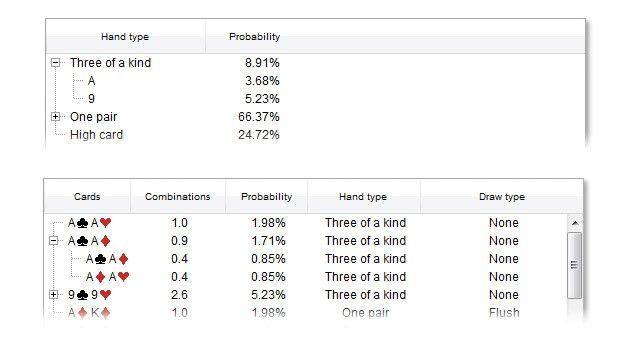
The hand range feature calculates a list of all hands that PokerSnowie would hold, given the circumstances of the game. At the top of the window the hand range is split by hand type. Clicking on the '+' sign opens the branch of the corresponding hand type and splits it further.
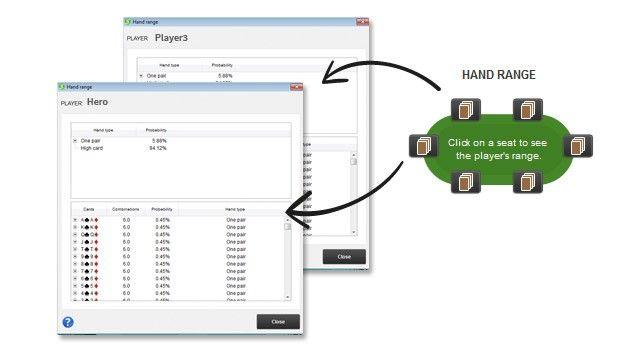
At the bottom all individual hands are displayed. They are grouped by hole cards that are considered the same. For example, on preflop all 12 combinations of JTo are grouped together and all 4 combinations of JTs.
The 'Combinations' column tells you the number of combinations remaining from that group. The combinations value may be further decreased by a certain percentage if PokerSnowie would have made the move the player made. If, for example, the player raised and PokerSnowie's advice is to raise 20% of the time, the combinations are multiplied by 0.2.
The 'Probability' column assigns a probability for each hand normalized over the whole hand range, so the sum of that column adds up to 100%.
The next column specifies the hand type, and the last column the draw type (if the situation is not on the river), for each hand. 'Straight (1)' is a gut shot straight draw and 'Straight (2)' an open-ended straight draw.
You can sort each column by clicking on the column name.
Please note that it can happen that no hands are found. That means that PokerSnowie would not have played the same way as the player did with any hand.